Every Category 2 Form 470 worth bidding, screened before you see it.

Workbench reads USAC's public data every night and keeps only the 470s you could win, each with its incumbent and the district's remaining C2 budget.

The Workbench pipeline: Form 470s from Illinois schools in New, Outreach sent and Decision columns. Each card shows the 470 number, services, city, consultant and allowable contract date, with buttons to add a quote, send outreach, and mark Bid, No-bid or Hold.

The pipeline in a demo workspace built from public USAC records. Contact details and incumbent figures are blurred.

Built on USAC Open Data: Form 470 filings, FRN status, Form 471 line items, entity profiles and student counts, refreshed every night. Nothing is scraped from EPC, and Workbench never needs your EPC login.

Seven days of Pro, with 3 quote checks and 3 exports. A card is required to start. Sign in with your work email; there's no password to set.

From posting to funding, on one bench

A Form 470 has to sit 28 days before a contract can be signed. Workbench is built around that clock: find the filing early, size it up, decide, and follow it to the award.

Screen out what you'd never bid

Set your bases, how far you'll travel and what you sell. Every new Category 2 filing in your states is measured against them overnight.

  • Miles from your nearest base, with a separate cap for on-site maintenance
  • Internal connections, MIBS, BMIC, cabling and equipment resale
  • Automatic no-bid for equipment-only, portal-only, license-renewal and consortium requests
  • Your own rules for the consulting firms you follow or skip
Screening rules: states, maximum distance from a base, BMIC distance cap, services you sell and automatic no-bid options for equipment-only, portal-only, license-renewal and consortium requests.
Screening rules. Saving re-screens every posting in your window.

Read the keepers before your first call

The matches arrive as a morning email at the time you choose: each 470 with its city and distance, services, allowable contract date, consultant, budget and flags, plus what the screen dropped and why.

Up to ten people on your team can get it.

Email digest preview: subject line with the workspace name and date, then each matching Form 470 with its number, applicant, city, distance from base, services, allowable contract date, consultant and C2 budget.
The morning digest preview. Incumbent lines and links are blurred.

Know the account before you call

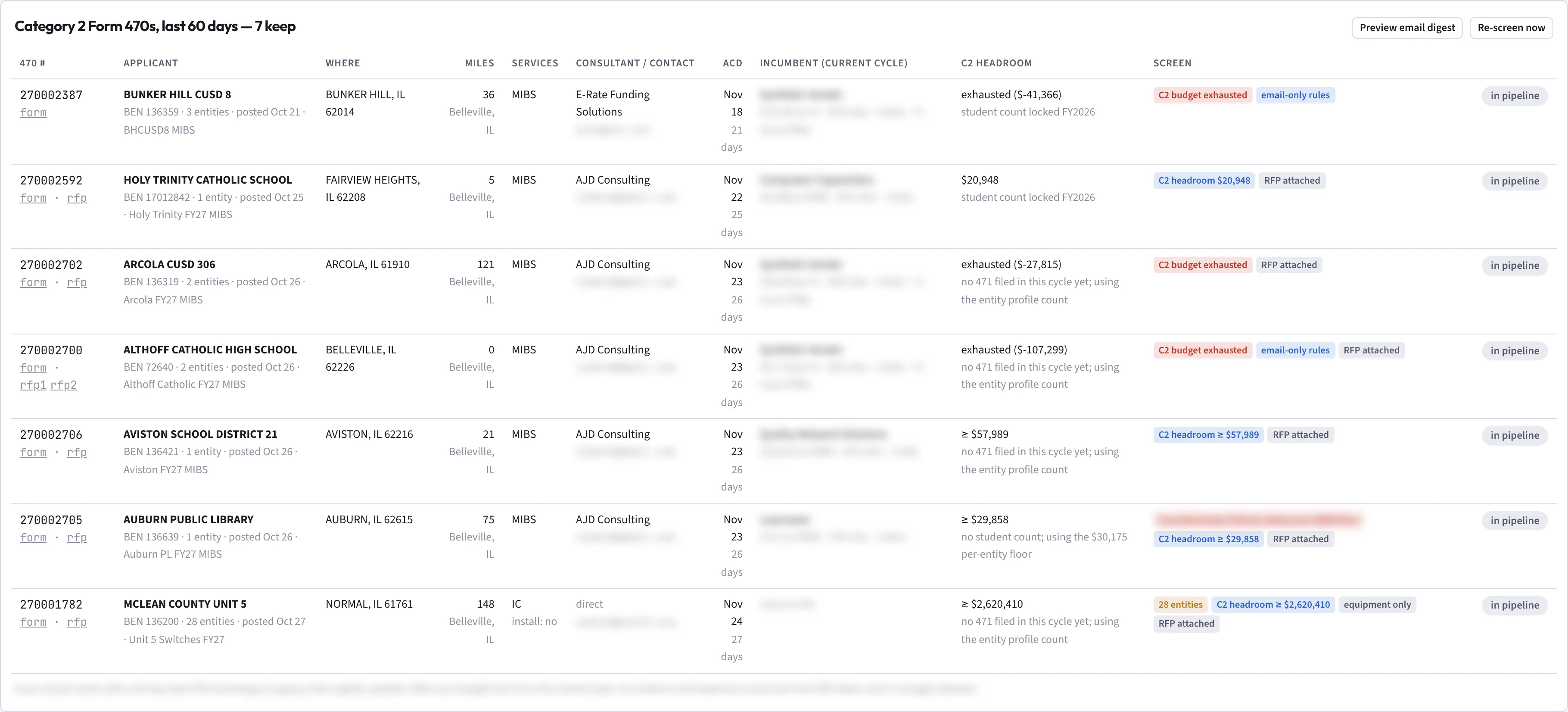
Each match shows who holds the work today and how much Category 2 budget the district has left this cycle, worked out from its student count and what it has already drawn. When the budget is spent, you see it before you write a quote.

Flags tell you the rest at a glance: RFP attached, email-only bidding rules, days left to the allowable contract date.

The 470 Monitor table: each Form 470 with applicant, BEN, city, miles from base, services, consultant, allowable contract date and C2 headroom, for example exhausted at minus 41,366 dollars or 20,948 dollars left.
The 470 Monitor. Contact emails and incumbent figures are blurred. Select the image to open the full table in a new tab.

Decide in a click, quote from your own prices

Add keepers to the pipeline, mark outreach sent, then Bid, Hold or No-bid. Every card counts down to its allowable contract date. Quotes start from your own price book, imported by CSV from a template, so the board shows real margin and a win estimate.

Price against what USAC funded Pro

Pricing Research shows the 25th percentile, median and 75th percentile of what USAC actually funded, by state and product class, and looks up any applicant's incumbent and past awards by BEN. Check a quote against the awarded band before it goes out.

Follow it through the 471 Pro

Once your bid is in, the award watch finds every FRN that names your SPIN and tracks it through PIA review and the funding commitment, then lists the invoicing deadlines that follow.

Funding-year calendar: Form 470 postings July to December, the 471 window January to March, PIA review, FCDL waves April to September, service start and Form 486, then invoicing.
The funding-year calendar on the Awards & 471 page. FRNs that name your SPIN are listed beneath it once you have them.

New to E-Rate? Start with the registrations

The Provider Setup tracker walks you through SAM.gov, your FCC Registration Number, Form 498 for a SPIN, the EPC account and the annual SPAC, in order, with a place to record each confirmation. You can watch 470s while the paperwork clears.

Provider Setup checklist: register in SAM.gov, get an FCC Registration Number, file Form 498 for a SPIN, create the EPC account and file the Service Provider Annual Certification, each with a notes field.
Provider Setup in a new workspace.

Built by a provider that bids on 470s

Workbench started as the monitor and bid pipeline Mars Network Services built for its own E-Rate bids. The screens, the flags and the order of the steps come from working real filings.

Public data, private workspace

  • No EPC login, no scraping.Every record comes from USAC's public Open Data.
  • Nothing filed for you.Bids, 471s and certifications stay in your hands.
  • Your prices stay yours.Your price book, quotes and decisions are visible only to your team and never feed anyone else's benchmarks.

Plans

Every plan includes nationwide access: watch Form 470s in any state. Every trial starts on Pro: 7 days, with 3 quote checks and 3 exports, and a card to start. Subscriptions run for 12 months, billed annually or monthly; paying annually gets you 12 months for the price of 11.

What each plan includes
Feature StarterOne bidder working one region RecommendedProA small bid team across several states Coming soonTeamLarger bid teams, several offices
Price$1,200a year, or $109 a month$3,000a year, or $273 a month$5,800a year, or $527 a month, when Team launches
Users included1310
Nationwide: Form 470s from every stateIncludedIncludedIncluded
470 Monitor and morning digestIncludedIncludedIncluded
Incumbent and C2 budget on every matchIncludedIncludedIncluded
Pipeline, quotes and price bookIncludedIncludedIncluded
Provider Setup trackerIncludedIncludedIncluded
Pricing Research by state and product classNot includedIncludedIncluded
Awards & 471 watch on your SPINNot includedIncludedIncluded
Extra users$415 a year or $38 a month each, on every plan

Recommended

Pro · 3 users included

$3,000 a year, or $273 a month

A small bid team across several states. Everything in Starter, plus Pricing Research by state and product class and the Awards & 471 watch on your SPIN.

Starter · 1 user included

$1,200 a year, or $109 a month

One bidder working one region. 470 Monitor and morning digest, incumbent and C2 budget on every match, pipeline with quotes and price book, Provider Setup tracker.

Coming soon

Team · 10 users included

$5,800 a year, or $527 a month, when Team launches

Larger bid teams and several offices. Everything in Pro.

Every plan includes nationwide access. Extra users are $415 a year or $38 a month each, on every plan.

Start 7-day trial

Questions providers ask

Where does the data come from?

USAC Open Data, the public datasets USAC publishes for Form 470s, FRN status, Form 471 line items, entity profiles and student counts. Workbench refreshes them every night. It never logs in to EPC.

Is E-Rate Workbench affiliated with USAC or the FCC?

No. It's an independent tool for service providers that reads USAC's public data. USAC's systems remain the official record.

Do I need a SPIN before I start?

No. Without one, the workspace opens on the Provider Setup tracker and the monitor runs from day one. Add your SPIN when it's issued and the award watch starts.

What happens when the trial ends?

You add a card when you start the trial. When the 7 days are up, your subscription starts on that card. To cancel before then, email support@erateworkbench.com. Your bases, rules, price book and pipeline carry straight over. The details are in section 3 of the Terms.

Does it work with my quoting system?

Today your price book and quotes come in by CSV, with a template to start from. Direct connections to quoting and PSA tools are planned and not yet available.

Who can see my prices and pipeline?

Only the people you invite. Owners handle billing, settings and the team; bidders make decisions and build quotes; viewers can read without changing anything. Your data never feeds another company's benchmarks.

Does Workbench send outreach or file anything?

No. Outreach is copy-and-send from your own email in this release, and bids, 471s and certifications are filed by you with USAC.

Set up your bases before the next filing window

Setup takes about five minutes, and the monitor back-fills the last 60 days of postings so your first morning isn't empty.